
Using the generator on sunov6.net
This guide covers the controls on this independent website, not the official Suno application. The current integration uses a third-party MiniMax Music 3.0 service. Official Suno model features and plans are separate from the options available here.
Updated . The instructions below describe this website’s sign-in, generation, and download flow. See our website disclaimer for the relationship to third-party products.
Quick Start: Create Your First Suno V6 Track
Turn one musical idea into a first draft in three steps.
Set the Musical Direction
Name the genre, mood, tempo, and main instruments.
Choose How to Handle Vocals
Choose Vocal or Instrumental. Add lyrics yourself or enable Auto-write lyrics.
Generate a First Version
Generate the track, listen through, then change the detail that matters most.
Before You Create Your First Suno V6 Song
Before opening the generator, decide the mood, one or two defining sounds, and whether the track needs vocals.
- Mood: What should the song feel like—uplifting, cinematic, relaxed, dark, or energetic?
- Sound: Which instruments or textures should stand out—piano, guitar, synths, strings, or heavy drums?
- Vocals or Instrumental: Do you want a song with vocals and lyrics, or an instrumental track?
Those three choices are enough for a first draft.
Sign in and check your credits
You can prepare a prompt before signing in. Submitting a song requires an account. Each new generation request uses 5 credits, including another version of the same idea. Check the balance shown in your account; this guide does not promise a fixed free allowance. If your balance is below 5 credits, the generator opens the credit purchase dialog. Review the credit packs before purchasing.
For Vocal mode with Auto-write lyrics turned off, enter at least 10 characters of lyrics, up to the 3,000-character field limit. Choose Instrumental when you do not want lead vocals; that mode submits no lyrics.
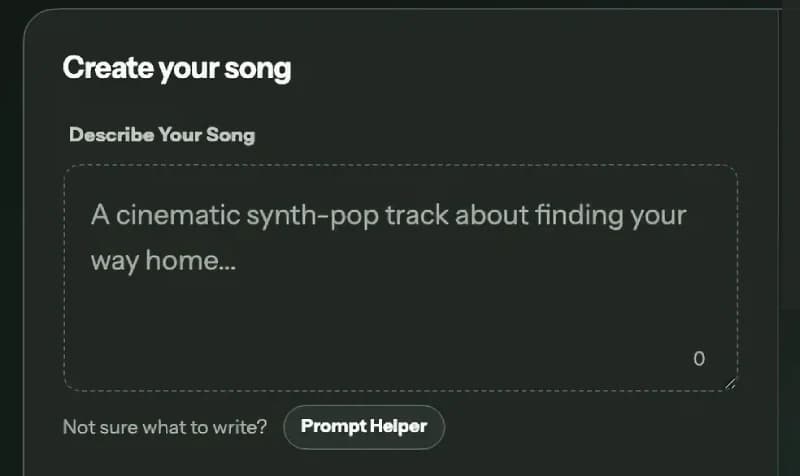
Step 1: Describe the Song You Want
Start with a clear Suno V6 prompt that describes the sound you want. Include the details that matter most, such as genre, mood, tempo, instruments, and vocal style.
You can write your prompt as a natural description or a compact list of musical directions. Start simple, then add more detail after you hear the first result.
A Simple Music Prompt Formula
Genre + Mood + Tempo/Energy + Instruments + Vocals + Arrangement
Think of this as a checklist rather than a strict template. You do not need every element in every prompt.
Example with Vocals
Upbeat synth-pop with an optimistic mood, mid-tempo energy, bright synths and punchy drums, warm female vocals, a catchy chorus, and a short atmospheric intro.
Instrumental Example
Cinematic electronic instrumental with a slow build, deep percussion, warm analog synths, wide atmospheric pads, and a dramatic final section.
What Should You Include in a Suno V6 Prompt?
You don’t need every element in every prompt. Focus on the details that matter most to the sound you want.
Genre
Set the musical foundation with a style such as pop, rock, R&B, hip-hop, electronic, folk, cinematic, or ambient. You can blend compatible influences, but keep one style as the main direction.
Mood
Describe how the music should feel.
- Dreamy
- Uplifting
- Melancholic
- Intimate
- Hopeful
- Energetic
Tempo or Energy
Describe the pace or intensity of the track. Use a specific tempo such as “mid-tempo, 100–120 BPM,” or keep it simple.
- Slow
- Mid-tempo
- Fast
- Relaxed
- Driving
- High-energy
Instruments
Name the sounds you want to stand out. Focus on the instruments that define the idea rather than listing everything.
- Acoustic guitar
- Piano
- Strings
- Analog synths
- Bass
- Heavy drums
Vocals
If you want a vocal song, describe the character of the performance.
- Soft, intimate vocals
- Bright pop vocals
- Soulful lead vocals
- Powerful delivery
- Airy vocals
- Layered harmonies
Arrangement
Describe how the track should develop over time.
- Atmospheric intro
- Stripped-back verse
- Gradual build
- Larger chorus
- Instrumental break
- Dramatic final section
Quick Prompt Tip
If your first prompt feels complicated, simplify it.
Instead of trying to describe several genres, moods, instruments, and production styles at once, decide which two or three characteristics matter most. A focused prompt is easier to refine after you hear the first generation.
Step 2: Choose Vocal or Instrumental
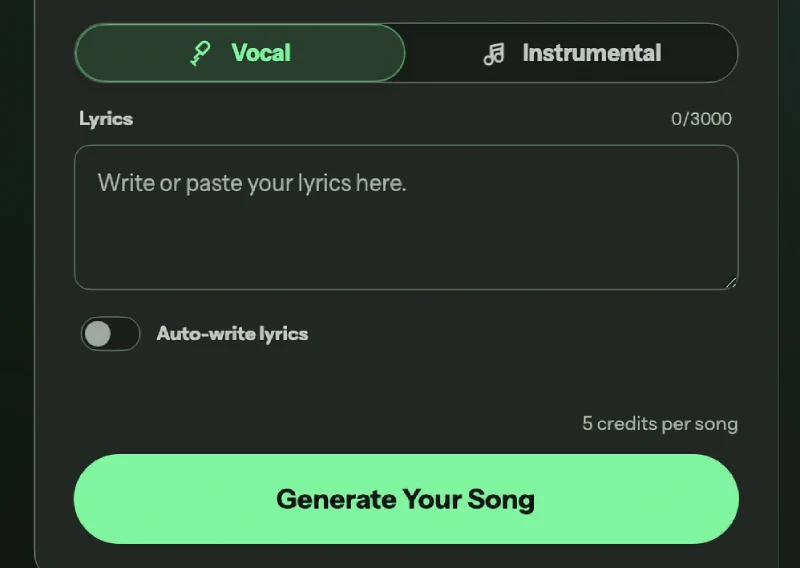
Next, choose whether you want a song with vocals or an instrumental track. Use the Vocal and Instrumental controls below the prompt field to select the type of music you want to generate.
Create a Song with Vocals
Choose Vocal when you want singing and lyrics in your track. In Vocal mode, you can write or paste your own lyrics in the Lyrics field, or turn on Auto-write lyrics if you want help creating them.
Your music prompt should describe how the track sounds, while the Lyrics field provides the words to be sung.
Late-night R&B with electric piano, deep bass, restrained drums, and a close, soulful lead vocal.
You can also describe the vocal character in your prompt with directions such as soft and intimate, soulful, bright pop, airy, powerful, or layered harmonies.
Write Your Own Lyrics or Use Auto-write Lyrics
If you already know what the song should say, enter your lyrics directly in the Lyrics field.
If you have a song idea but no finished lyrics, turn on Auto-write lyrics and give the song a clear concept in your prompt.
Acoustic folk about returning to a hometown after years away.
A useful rule is:
- Music prompt: describes the sound, mood, instruments, and vocal direction.
- Lyrics: provide the words, story, or message of the song.
Create a Suno V6 Instrumental
Choose Instrumental when you want music without a lead vocal. Focus your prompt on the elements that shape the track itself, such as rhythm, harmony, instruments, texture, atmosphere, and arrangement.
Instrumental generation can work well for cinematic music, video backgrounds, game music, ambient tracks, electronic music, beats, study music, and acoustic arrangements.
Fast electronic game soundtrack with pulsing bass, sharp percussion, and a tense final build.
Instrumental Prompt Tip
When you switch to Instrumental, replace vocal instructions with more detail about the music.
Instead of
Cinematic music with soft vocals.
Try
Cinematic instrumental with soft piano, warm strings, low percussion, and a slow build toward a wide emotional finale.
Step 3: Generate, Listen, and Refine
When your prompt and generation options are ready, click Generate Your Song.
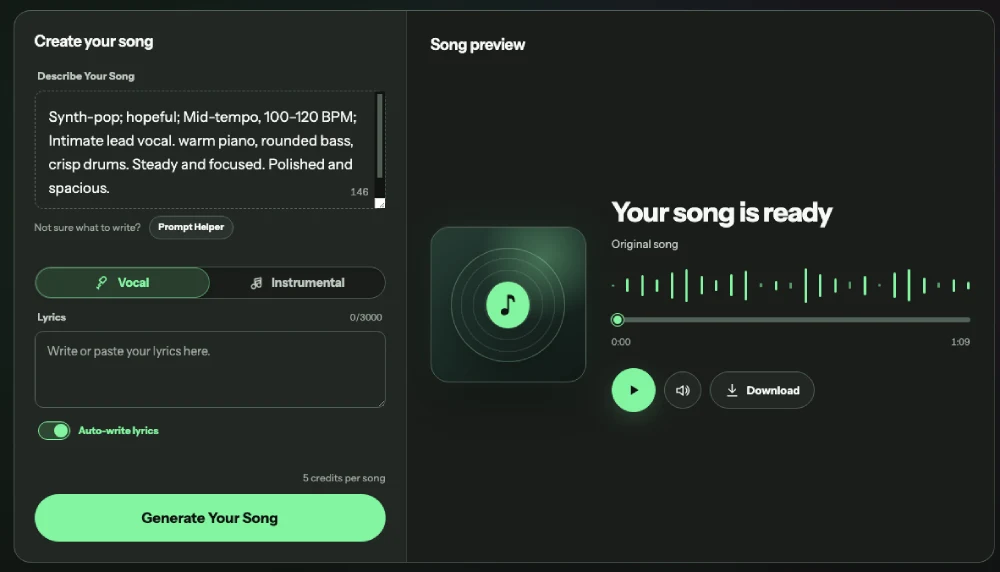
The preview shows a waiting state while the request is processed. The interface estimates 2–5 minutes, but completion time can vary. If processing continues, use My Creations to check the existing request before submitting another one.
Once the track is generated, listen to the full result before making major changes. Some sections may develop differently later in the song, so judging only the opening can give you an incomplete impression.
Instead of asking only whether you like the result, compare it with the direction you originally described.
What to Listen For
Focus on five things:
- Style: Does the genre and overall sound match your prompt?
- Mood and energy: Does the track feel as calm, dark, uplifting, aggressive, or dramatic as intended?
- Instrumentation and vocals: Are the important instruments clear? If you chose vocals, does the vocal style fit?
- Arrangement: Do the intro, transitions, chorus, and final section develop in the way you expected?
- Biggest mismatch: If you could change only one thing, what would it be?
You do not need to fix everything in one generation. Start with the change that would make the biggest difference.
How to Refine Your Prompt
If the overall direction is already working, keep the strongest parts of your prompt and change one major element at a time whenever possible.
This makes it easier to understand which prompt changes are actually improving the result.
First Prompt
Lo-fi hip-hop beat with mellow keys.
Refined Prompt
Lo-fi hip-hop instrumental with dusty drums, muted jazz piano, warm bass, and a short vinyl-textured intro.
The second version keeps the style but clarifies the instruments, texture, and opening.
A Simple Refinement Workflow
- Listen to the full track.Give the generation enough time to develop before deciding what needs to change.
- Identify what already works.Keep the genre, mood, instruments, vocal style, or arrangement choices that match your idea.
- Find the biggest mismatch.Choose the one element that is furthest from your intended result.
- Refine that part of the prompt.Use more specific musical language instead of rewriting the entire prompt.
- Generate another version.Keep the rest of the prompt and generation choices relatively consistent when possible.
- Compare both versions.Ask whether the new result is closer to your original goal, not simply whether it sounds different.
How to Write Better Suno V6 Prompts
Write the prompt like a short music brief. Establish the defining sound first, then add details that change the performance or structure.
Build Around One Musical Direction
Choose a clear foundation before adding secondary details. Combining too many unrelated genres, moods, or production styles can make the intended direction less specific.
Instead of
Indie pop, cinematic, EDM, folk, rock, dreamy, aggressive, emotional, and energetic.
Try
Emotional indie pop with warm acoustic guitar, restrained drums, intimate vocals, and a larger cinematic chorus.
The second prompt still contains contrast, but every element supports the same overall direction.
Lead With the Defining Sound
Put the most important musical characteristic near the beginning of the prompt.
For example:
Piano-led cinematic ballad with intimate vocals and a slow emotional build.
This immediately establishes the primary instrument, style, vocal direction, and pacing.
If the vocal style matters most, lead with that instead:
Intimate breathy vocal performance over dreamy synth-pop production with warm analog keyboards and soft drums.
A Practical Prompt Structure
A simple structure for many prompts is:
Genre + mood + key instruments + vocal direction + arrangement or energy
Use only the parts that affect the track you want to hear.
Suno V6 Prompt Examples
Pop and Dance
Upbeat dance-pop with bright synths, punchy drums, energetic female vocals, and a catchy chorus with polished modern production.
Cinematic Instrumental
Emotional cinematic instrumental with warm strings, soft piano, distant percussion, and a gradual build from an intimate opening to a powerful final section.
R&B
Late-night contemporary R&B with warm electric piano, deep bass, restrained drums, smooth soulful vocals, and layered harmonies in the chorus.
Acoustic Folk
Gentle acoustic folk with fingerpicked guitar, warm natural textures, intimate vocals, and a simple storytelling arrangement.
Electronic Ambient
Spacious electronic ambient track with evolving pads, soft analog synths, minimal percussion, and a calm late-night atmosphere.
How to Get Better Results with Suno V6
When a generation does not match your idea, diagnose the problem before changing the prompt. The goal is to make a targeted adjustment rather than adding more description at random.
The Track Sounds Too Generic
Add one or two details that give the music a stronger identity. This could be a distinctive instrument, rhythmic feel, vocal delivery, production texture, or arrangement change.
Instead of:
Upbeat pop song.
Try:
Upbeat synth-pop with bright analog synths, punchy drums, playful female vocals, and a large sing-along chorus.
The Sound Feels Unfocused
Check whether too many ideas are competing for attention. If several genres, moods, or production styles are pulling the song in different directions, choose one as the foundation and remove details that do not support it.
The Vocals Feel Wrong
Describe how the vocals should be performed, not just whether vocals are present.
Useful directions include:
- intimate and restrained
- airy and soft
- soulful and expressive
- bright and energetic
- powerful and dramatic
- layered with harmonies
The Arrangement Feels Flat
Add direction for how the song should change over time.
For example:
- minimal opening
- gradual build
- larger chorus
- instrumental break
- stripped-back verse
- dramatic final section
- quiet ending
These details can help define movement without requiring you to describe every part of the song.
The Track Has the Right Style but the Wrong Energy
Keep the genre and core instrumentation, but adjust the intensity.
For example, change:
Dreamy electronic pop with warm synths and soft vocals.
to:
Dreamy electronic pop with warm synths, driving drums, more forward vocals, and a stronger high-energy chorus.
The Result Is Almost Right
Avoid replacing the entire prompt. Preserve the elements that already work and change the part that is causing the mismatch.
If the instrumentation is right but the vocals are wrong, refine the vocals. If the mood is right but the song feels static, change the arrangement. If the overall style works but lacks intensity, adjust the energy.
This keeps each revision focused and makes different generations easier to compare.
Common Suno V6 Prompt Mistakes
Starting Too Vague
Prompts such as “Make a good pop song” provide very little musical direction. Give the model a clearer foundation through genre, mood, instrumentation, vocal character, or arrangement.
Adding Too Many Competing Ideas
More styles do not necessarily create a more interesting result. Too many unrelated directions can make the intended sound less clear.
Describing Style but Not Movement
A prompt can describe the genre and mood clearly while saying nothing about how the song develops. Add arrangement details when structure matters to your idea.
Using More Adjectives Instead of More Musical Information
Words such as “amazing,” “beautiful,” or “epic” may be less useful than specifying a larger chorus, heavier percussion, layered harmonies, or a slow build.
Treating Every Generation as a New Prompt
If you completely replace the direction after each result, it becomes harder to learn which instructions are affecting the music. Preserve successful elements whenever possible.
How to Give Suno V6 Clearer Musical Direction
A genre label tells Suno V6 where to start. Treat the prompt as a short musical brief when you need control over the sound or structure.
- style and mood
- lead instruments and production texture
- vocal character
- energy
- how the arrangement develops
Broad
Cinematic electronic music
Directed
Cinematic electronic instrumental with deep analog synths, restrained percussion, a spacious opening, and a gradual build toward a dramatic final section.
Use the longer version only when those details matter to the result.
For more starting points, visit the prompt examples and helper. To hear actual outputs, compare the documented music experiments, including their inputs and generation settings. Reusing a prompt creates a new result; it does not reproduce the original recording.
Generation, playback, and download help
The request has not started
Enter a song description first. In Vocal mode, add lyrics or turn on Auto-write lyrics. If you see “Your account is still loading”, wait for your account information to load before trying again. Check your credit balance after signing in.
The song is still processing
Open My Creations and check the existing task. A waiting state is not a completed song and is not proof of failure. Avoid creating duplicate requests while you are waiting: a new request uses additional credits.
A song is ready to save
Use the player to listen to the result, then select Download on the generated song or in My Creations. The featured example shown before generation is a listening sample, not your new output. Keep your prompt and settings alongside the downloaded audio so you can compare future versions.
Generation fails or audio will not play
Check My Creations and your balance before retrying. If the problem persists, contact support@sunov6.net with the time, displayed error, and task identifier if available. Do not send passwords or payment card details. This guide cannot guarantee a refund or credit restoration; consult the refund policy for the applicable process.
Suno V6 Tutorial FAQ
- How detailed should a Suno V6 prompt be?
- Use enough detail to identify the sound. Genre, mood, and a few defining instruments may be enough; add vocals, energy, or arrangement only when you want tighter control.
- Do I need music theory to write good Suno V6 prompts?
- No. Everyday phrases such as “soft piano,” “driving drums,” “intimate vocals,” or “slow build” give useful guidance without formal theory terms.
- How do I create an instrumental in Suno V6?
- Choose Instrumental, then describe the style, mood, key instruments, rhythm, production character, and how the track should develop.
- Can I start with a very simple prompt?
- Yes. A genre, mood, scene, instrument, or short musical idea can be enough for a first generation. Add detail after listening.
- Should I describe the song structure in my prompt?
- Only when structure matters. Phrases such as “quiet opening,” “gradual build,” “larger chorus,” or “dramatic final section” explain how the track should move.
- What should I do if Suno ignores part of my prompt?
- Move the important instruction closer to the beginning, remove competing ideas, and generate again without changing the parts that already work.
- Is a longer Suno V6 prompt always better?
- No. Clear musical information matters more than length. Remove vague adjectives, repeated ideas, and conflicting directions.